ラベル Windows 11 の投稿を表示しています。 すべての投稿を表示

2024/02/28

Windows 11 22H2向けCリリース提供終了の延期、今月のCリリースは?

Windows 11 ver 22H2向けのCリリースは2024年2月が最後になるとされてましたが、Home/Proは2024年6月まで、Enterprise/Educationは2025年6月まで延期だそうです。でも、2/27 PT リリース予定の今月の Cリリースはまだ出ていません(2/28 15:30 JST現在)。

Non-security preview updates will continue to be released for Windows 11, version 22H2
https://learn.microsoft.com/en-us/windows/release-health/windows-message-center#3255

2024/01/27

WMIC は Windows 11 vNext で削除、Windows Server vNext は Windows Server 2025

WMIC コマンドはずいぶん前に非推奨になってますが、2024年後半にリリース予定の Windows 11 の次のバージョンでいよいよ削除されると、非推奨機能リストの情報が更新されました。

Deprecated features for Windows client
https://learn.microsoft.com/en-us/windows/whats-new/deprecated-features
WMI command-line (WMIC) utility deprecation: Next steps
https://learn.microsoft.com/en-us/windows/release-health/windows-message-center#3237
WMI command-line (WMIC) utility deprecation: Next steps
https://aka.ms/WMIC-Deprecation

Windows Server vNext が Windows Server 2025 という名称になることも発表されました。

Windows Server Insider Preview 26040 is out - and so is the new name
https://techcommunity.microsoft.com/t5/storage-at-microsoft/windows-server-insider-preview-26040-is-out-and-so-is-the-new/ba-p/4040914 

”We've resumed the Windows Server Insider program after our winter break and there's a new build, new features, and - finally - the official branding: Windows Server 2025. ”

2023/12/19

Windows 11 23H2 eKB を手動でダウンロード&インストールする闇ワザ(?)

Windows 11 22H2 から 23H2 へのアップデートは、有効化パッケージ(eKB)が早くて便利。Windows 11 のダウンロード ページからのアップデート(インストール アシスタント or ISO)は、巨大なダウンロード(6GB超)だし、インプレース アップグレードなのでやりたくない。でも、Windows 11 23H2 の 有効化パッケージは Microsoft Update カタログでは公開されていない。通常の手段では Windows Update でやってくるのを待つしかない。

KB5027397: enablement パッケージを使用したバージョン 23H2 Windows 11機能の更新
https://support.microsoft.com/ja-jp/help/5027397


Pro 以上のエディションなら、「コンピューターの構成\管理用テンプレート\Windows コンポーネント\Windows Update\Windows Update から提供される更新プログラムの管理\プレビュー ビルドや機能更新プログラムをいつ受信するかを選択してください」ポリシーを有効にして、更新を保留する日数を「0」日とかに設定すれば速攻で検出、インストールすることができるんですが、Home エディションだとその手が使えない。

あっ、そういえば評価用の WSUS 環境があった。有効化パッケージはエディション関係ないはず。ということで...

2023/12/12

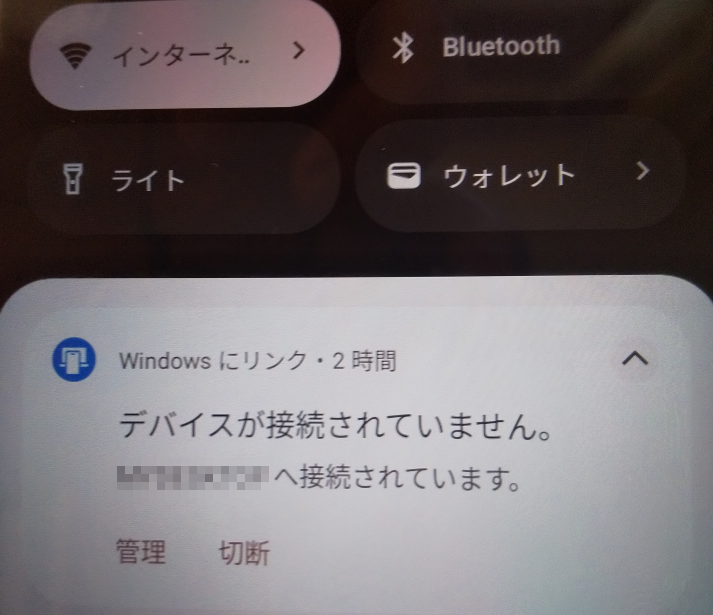
接続されていません、接続されています。

スマートフォン連携の相方の Windows にリンク(Phone Link)、接続時の通知メッセージがなんか変。

ちゃんと接続されて、機能しているのに、「接続されていません」「接続されています」って...

うちだけ? 気持ち悪いし、うざい。


設定を調整してこの通知が表示されないようにしたけど、Android 側アプリの通知履歴は→な感じ。(12/13、やっぱり通知がまた復活)

本来、「デバイスが接続されていません。」or「〇〇 へ接続されています...」のどちらかを表示するべきなんじゃないかと。「PC に接続しています」は1行だし。


追記)

この件、2024年4月中頃のアプリの更新で「デバイスが接続されています。」に修正されてました。

2023/12/05

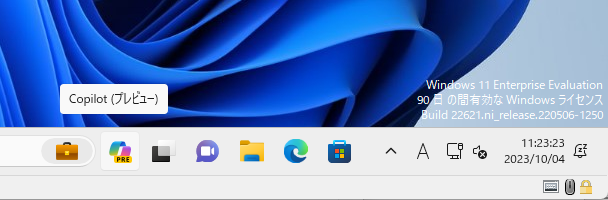
Copilot in Windows は正式提供されてない(2023年12 月現在プレビュー中)・・・ と思う

日本マイクロソフト自身がそう発表しちゃってるんであれですが、

Microsoft Copilot (現 Bing Chat、Copilot in Windows) を 12 月 1 日より正式提供開始。個人のお客様向け機能の紹介
https://news.microsoft.com/ja-jp/2023/11/28/231128-microsoft-copilot-officially-launched-on-december-1-introduction-of-features-for-individual-customers/

”Copilot in Windows が正式提供開始”みたいなニュースが出てます(これとか)。でも、Copilot in Windows(旧称 Windows Copilot)は Windows 11 も Windows 10 もまだ Preview なんですけど...(盛大な誤報祭り?ブランド統一、名称変更で皆混乱?)

最初の発表 (Ignite 2023)では、 Copilot in Windows が 12/1 に GA になるなんて一言も言うてませんでした。GA になったのは、Microsoft Edge からのアクセス (https://copilot.microsoft.com) と Edge サイドバーの Copilot (旧称 Bing Chat/Bing Chat Enterprise)。

2023/11/09

うそ!usoclient startscan は Windows 11 ではもう使えない?(訂正あり)

最近使っていなかったので気が付かなかったんですけど、Windows 10 でコマンドラインから Windows Update のスキャンなどを開始する usoclient StartScan などは、Windows 11 では利用できない模様。

Windows 11 で usolient.exe のテキスト抽出してみると...

C:\Windows\System32>strings usoclient.exe |find /I "start"
GetStartupInfoW

C:\Windows\System32>

Windows 10 はこんなにあるのに。Windows 11 ver 21H2 まではいろいろあった。ちょっと結果は違うけど。

C:\Windows\System32>strings usoclient.exe |find /I "start"
StartScan
StartBypassScan
StartInteractiveScan
...

関連:

Windows 10 と Windows Server 2016 で wuauclt /detectnow の代わり (2017/07/26)

追記)あれ? 自動更新のタスク(UpdateOrchestrator\Schedule Scanなど)は usoclient StartScan のままだ。


実装方法が変わった、Update Orchestrator サービスの DLL(usapi.dll とかusosvcimpl.dll とか)の方に移動した、のかもしれず、完全に使えなくなったわけでもないっぽい。usoclient StartInteractiveScan は使えた。StartScan もいけるかも(前回チェックから間が空いてたら、明日確認予定)。


2023/11/07

Windows 11 ver 23H2 Enablement Package をアンインストールしてみた

(訂正:初出時、タイトルの KB 番号間違ってましたので KB 番号 削除しました)

有効化パッケージで Windows 11 ver 22H2 から Windows 11 ver 23H2 に更新すると、アンインストール可能な更新プログラムに「Feature Update for Windows 11 23H2 via Enablement Package (KB5027397)」が出現します。ちなみに、このパッケージは、C:\SoftwareDistribution\Download に展開されたサイズは100MB程度(ダウンロードパッケージはたぶんKB単位)。

この KB5027397 をアンインストールしてみました。

2023/11/02

Cortana のアンインストール方法 最新版(2023年11月)

Windows 11 ver 23H2 にアップデート後、追加されたアプリで不要なものがないか、見つけてアンインストールしていったところ、Cortana がアンインストール可能になってました。8 月時点ではInsider(Cannary)で可能になってたみたいですが。

Windows 11 の新機能?って一瞬思いましたが、Windows 10 でもアンインストール可能になってます。いつから? 品質更新で? Cortana アプリの更新で? でも 2023/08/01のだし違うか?

ネット検索すると、PowerShell 使って無理やり削除する方法が多数見つかりますが、これでもうそんなことする必要ないですね。 


2023/11/01

Windows 11 2023 Update (ver 23H2) リリース

2023/10/31 PT に Windows 11 の機能更新プログラム、2023 Update、23H2 がリリースされました。

22H2 と同じ NI_RELEASE。Windows 11 22H2 に対しては小さな有効化パッケージ(eKB)形式でやってくるので(Feature Update for Windows 11 23H2 via Enablement Package (KB5027397))、それを待つのがいいと思います。 (たぶん 22H2 評価版や、非対応PCで無理やり22H2を動かしてるデバイスにはこない)

GA ビルドは 22631.2428、2023-10 C (KB5031455) で 22631.2506。

Windows 11 2023 Update available
https://learn.microsoft.com/en-us/windows/release-health/windows-message-center#3203
バージョン 23H2 Windows 11の新機能
https://learn.microsoft.com/ja-jp/windows/whats-new/whats-new-windows-11-version-23h2

VWindows 11 をダウンロードする  (現在のリリース: Windows 11 2023 更新 l バージョン 23H2) ← 毎度のことですが “Windows 11 2023 Update|バージョン 23H2” です。
https://www.microsoft.com/ja-jp/software-download/windows11
Windows 11 Enterprise 評価版
https://www.microsoft.com/ja-jp/evalcenter/evaluate-windows-11-enterprise

既知の問題(現時点では 22H2 と同じ)
https://learn.microsoft.com/en-us/windows/release-health/status-windows-11-23h2

EoS は Home と Pro が 2025/11/11 (リリース後 24 か月)まで、Enterprise と Education が 2027/11/10 (リリース後 36 か月)まで。

Windows 11 Enterprise and Education
https://learn.microsoft.com/en-us/lifecycle/products/windows-11-enterprise-and-education
Windows 11 Home and Pro
https://learn.microsoft.com/en-us/lifecycle/products/windows-11-home-and-pro

うちの Windows 11 22H2 数台は、「更新プログラムのチェック」をクリックしても着弾しなかった(「利用可能になったらすぐに最新の更新プログラムを入手する」をオンにしても、11/7 オフにしたら着弾)。段階的に提供しているんだと思います。Pro 以上なら「コンピューターの構成\管理用テンプレート\Windows コンポーネントWindows Update\Windows Update から提供される更新プログラムの管理\プレビュー ビルドや機能更新 プログラムをいつ受信するかを選択してください」ポリシーを有効にして、「0」日指定すればすぐくるはず。

管理されているデバイスでは、22H2 のエンタープライズ機能制御の無効化対象機能が、23H2 で有効になります。

Windows 11でのエンタープライズ機能の制御
https://learn.microsoft.com/ja-JP/windows/whats-new/temporary-enterprise-feature-control

追記)WSUS にはまだ同期されない。11/1 8:43 現在  

訂正)WSUS にも来てました。Windows 10のときは通用の「機能更新プログラム」と、「機能更新イネーブルパッケージ経由」の2つに分かれてましたが、Windows 11 22H2 以降向けの WSUS の新しい UUP パッケージは、有効化パッケージ(KB5027397)と通常の機能更新プログラム(.esd)が1パッケージに統合されているっぽい。この3ファイルだとしたら109KB。


 さらに追記)

評価版(ja-jp)ISOは 5.95 GB、VS サブスク ISO Business(ja-jp) 6.09 GB、 Consumer(ja-jp) は 6.15 GB、いずれも過去最大クラス。

さらに、さらに追記)

いろんな方法を試していたところ、99%問題に遭遇した模様。以下で進むかもしれないけど、解決できないかもしれないので、ISO からのアップデートに切り替えた。→ 仮想マシンで VHDX が超肥大化してたので(更新が超遅くなったので)、さらにクリーンインストールに切り替えた。あぁすっきりした(ホストもVMも)。

Windows 10 アップグレード アシスタントの進行状況が 99% から進まない
https://support.microsoft.com/ja-jp/windows/861fd3a5-1b9a-35b5-4e5e-a502cfd65dc8

11/7)「利用可能になったらすぐに最新の更新プログラムを入手する」をオンにしてもこなかったやつ、オフにしたら着弾した。
11/8)チェックポイント戻してもう一度同じことをしても、今度はこない。


2023/10/05

「Windows バックアップ」アプリは組織の ID では使えない

KB5032038: Windows 10 および Windows 11 にインストールされているWindows バックアップの概要
https://support.microsoft.com/help/5032038

"Windows バックアップは、Microsoft Entra ID または Active Directory (AD) ユーザーではサポートされていません。"

私は、「バックアップと復元(Windows 7)|システム イメージの作成」(Complete PC Backup/Restore)派。と思い出したので、2か月ぶりにバックアップ実行しとこう。

2023/10/03

Windows 365 ブート&スイッチ GA

2023-09 C と同じ日、9/26 PT に Windows 365 ブート&スイッチが GA(一般提供)。一部報道で Windows 11 バージョン 23H2 で利用できるみたいなのを見かけましたが、Windows 11 バージョン 22H2 で GA です。

Windows 365 Boot is now generally available!
https://aka.ms/W365BootGAblog
Windows 365 Switch is now generally available!
https://aka.ms/W365SwitchGAblog 

どちらの機能も Windows 11 ver 22H2 Pro/Enterpriseの OS ビルド 22621.2361 以降(たぶんクラウド PC 側もそうする必要あるかも)で利用できて、Windows 365 ブートの方は、Windows 365 Enerprise/Frontline(Microsoft Intune の環境が必要だから?)、Windows 365 スイッチは全エディション(ストアアプリの追加機能)で利用可能だと思う。CFR の新機能の有効化とは関係なく使えるような気がする(定かではない、最後に追記したように、Evaluation では使えてる)。

Windows 365 ブートは、Windows Autopilot へのデバイス登録と、Windows Autopilot による OOBE セットアップが必要なので、試すのは難しいですが、Windows 365 スイッチの方は Microsoft Store から Windows 365 (現時点でアプリ名に Preview ついてる)アプリをインストールすれば利用できました。ただし、GA アナウンスに書いてあるように、アプリをインストールしてから利用可能になるまでマジで数時間(2、3時間の話でないかも、6 時間ほど放置してたので不明、進捗状況の表示とかまったくなし)かかりました。お試すかたは気長に、気長ーーーーに待って。

"Wait a few hours before Switch is fully enabled on your device."
スイッチは、Windows 11 Enterprise Evaluation でも大丈夫だった。→ Windows 11 Enterprise Evaluation (22H2) には CFR の新機能が有効にならない?


Windows 11 Enterprise Evaluation (22H2) では CFR の新機能が有効にならない?(ウソ、訂正あり)

Windows 11 Enterprise Evaluation (評価版) 22H2 で 2023-09 C の新機能たちを有効にしたつもりが、Copilot さんが見当たらない。Evaluation は対象外なの?

新機能が一般提供 (10 B or 11 B?)になると来るのかしらん?


10/4 追記)Microsoft アカウント or 職場(Microsoft Entra ID)or 学校のアカウントによるサインインが必要でした。大変、失礼しました。

Welcome to Copilot in Windows
https://aka.ms/copilotlear    nmore

"If you're signed in with a local account, Copilot in Windows isn't available.”


2023/09/28

Windows 11 22H2 Moment4 -> 23H2?(再び)

(注:この記事は妄想です、内容をうのみにしないでください。)

昨日からCFR(Controlled feature rollout)で段階的なロールアウトが始まった以下の新機能(Copilot in Windows Previewなど)のことを、「Windws 11 ver 22H2 Moment 4 (Update)」と表現しているのを国内外の記事で見かけました。

September 26, 2023—Windows configuration update
https://support.microsoft.com/ja-jp/topic/september-26-2023-windows-configuration-update-542780c2-594c-46cb-979d-11116fe164ba

Microsoft さんは、Moment 1、2、3、4 って公に表現してきたことはないと思いますが(概念的なものを除いて)、昨日のは本当に Moment 4なのでしょうか?

C:\Windows\Servicing\Packages)に 2023-09 C  後に *Moment4-EKB* パッケージが更新されていたので、「Windows 11 22H2 Moment4 -> 23H2?(2023/09/09)」の実験を、最新ビルド22621.2361、Windows構成更新プログラムなし)で再び実施してみました。すると...

2023/09/22

Windows 11 23H2 に関する発表?、否、Windows 構成の更新による新機能追加の段階的ロールアウト(CFR)開始

↑なんちゃって23H2 (9/26 PT はこれじゃあない)

Windows 11 23H2 かもしれないし、そうじゃないかもしれない Windows 22H2 に多くの新機能が米国時間2023/9/26から段階的にロールアウト開始(アナウンスには23H2とは一言も書いていない)。 Microsoft 365 Coplilot は 11/1 に GA。事前に発表するなんて珍しい。とはいえ、アナウンスには23H2とは一言も書いていない、next Windows 11 update と書いている、Feature Update なのか Quality Update なのかわからん。時期的に 2023-09 C for Windows 11 22H2なのかもしれない。

Announcing Microsoft Copilot, your everyday AI companion
https://blogs.microsoft.com/blog/2023/09/21/announcing-microsoft-copilot-your-everyday-ai-companion/

9/25 追記)ちゃんと↑に書いてあった。

”These experiences, including Copilot in Windows and more will start to become available on Sept. 26 as part of our latest update to Windows 11, version 22H2.”

Announcing Microsoft Copilot, your everyday AI companion
https://news.microsoft.com/september-2023-event/

https://blogs.windows.com/windowsexperience/2023/09/26/the-most-personal-windows-11-experience-begins-rolling-out-today/

9/25追記)Windows Configuration Update (Windows構成の更新)でくる新機能だったみたい。

Rolling out new features for Windows 11 (22H2) to the Release Preview Channel
https://blogs.windows.com/windows-insider/2023/09/22/rolling-out-new-features-for-windows-11-22h2-to-the-release-preview-channel/

”If you have the toggle to get the latest updates as they are available turned ON via Settings > Windows Update BEFORE installing Build 22621.2361, you will also get Windows Configuration Update (KB5030509) installed at the same time you install Build 22621.2361 in a single reboot. Note only the update for Build 22621.2361 will show during install on the Windows Update settings page. But after reboot, the Windows Configuration Update will be shown in your Update History. This Windows Configuration Update is how we’re enabling new features via Controlled Feature Rollout (CFR) technology.”


9/25さらに追記)こっちのアナウンスには明確に書いてあった。22H2の2023-09 Cで新機能として段階的にロールアウトが始まり、2023年Q4の23H2にも盛り込まれる、と。

Copilot in Windows and new Cloud PC experiences coming to Windows 11|Windows IT Pro Blog
https://techcommunity.microsoft.com/t5/windows-it-pro-blog/copilot-in-windows-and-new-cloud-pc-experiences-coming-to/ba-p/3933653

”On September 26th, Copilot in Windows will start to roll out in September 2023 optional non-security update for Windows 11, version 22H2--and will be available behind the commercial control for continuous innovation. It will later be included in Windows 11, version 23H2, the annual feature update for Window 11, which will be released in Q4 of this calendar year. ”

これら↓の記事は誤報かもしれないので注意。Bing Chat も影響されちゃってる(9/26、「Windows 11バージョン23H2は、2023年第4四半期にリリース予定です。」に答えが変わった。)。

Windows 11の大型アップデートが9月26日に実施 Copilotのプレビューも/OpenAIが「DALL-E 3」を発表 「ChatGPT」統合(→9/26修正されたけどなんか苦しまぎれ。”Windows 11の大型アップデート「Windows 11 22H2」を9月26日に実施”)
https://www.itmedia.co.jp/pcuser/articles/2309/24/news027.html

Windows 11、9月26日の大型アプデ「23H2」で「Microsoft Copilot」ビルトイン(→ 9/27 9月26日の大型アプデ「22H2」で...に変更された)
https://www.itmedia.co.jp/news/articles/2309/22/news089.html

Panos氏の決別とWindows 11 バージョン23H2のリリース日決定 - 阿久津良和のWindows Weekly Report (→ 9/25 18:00 頃、バージョン23H2→最新バージョンに変更された)
https://news.mynavi.jp/article/20230924-windows_report/

こっち↓は正しいと思われる記事。
Microsoft clarifies Windows 11 23H2 update isn’t arriving next week
https://www.yahoo.com/lifestyle/microsoft-clarifies-windows-11-23h2-150057474.html

関連:
Windows 11 22H2 Moment4 -> 23H2?

9/27 追記)リリースされました。この投稿、たくさん変更しましたが、初出時、タイトルにハテナ「発表?」つけててよかった。

今日の Windows Update - 2023-09C & CFR to Windows 11 22H2


2023/09/19

Windows 11 22H2 Moment4 -> 23H2?

そろそろ、Windows 11 23H2 の発表があるとかないとか、噂話が飛び交っていますが(→ Windows latest | Windows 11 23H2 is imminent as Microsoft rolls out Windows Configuration update)、Windows 11 23H2 は有効化パッケージ(EKB)形式で提供されることは決まっているそうで、

Windows 11 23H2 は有効化パッケージで2023 年 Q4 に、Windows 11 LTSC は 2024 年後半に(2023/07/14)
 

C:\Windows\Servicing\Packages の下を見ると、Momemt4 関連の EKB パッケージ(.mum)がちらほら。 Moment3は5月~7月にかけて Windows 構成の更新で来たヤツ(タスクバー上の時計の秒針とか)ですが、もしかして、Moment4って時期的に...?


試しに、2023/9/13 (2023-09 B)のタイムスタンプのものをすべて DISM /Add-package してみると...

2023/08/22

Windows 10/11 Evaluation のライセンス認証失敗してる?(8/24 問題解消か?)

まだ残りたくさんあったはずなにに、Windows 10 22H2 Enterprise Evaluation のライセンス認証切れ。ネットで検索してみると、8 月中頃に同様の問題発生中? とりあえず VM については 8/8 のチェックポイントを大事に保持しときながら、もう少し探ってみようか、みまいか。

Why is a fresh Enterprise Evaluation installation license expired?
https://answers.microsoft.com/en-us/windows/forum/all/why-is-a-fresh-enterprise-evaluation-installation/df0b8887-f89a-4cea-b565-834922f3c27a?page=2

8/23 追記)Windows 10 22H2 Enterprise Evaluation を新規インストールしてみた。ダメだった。

向こう側の問題のような気がする。 


さらに追記)有効期限内でしばらく起動してなかった( 8/9 以降起動していない)VM (10 22H2 Evaluation、11 22H2 Evaluation、Server 2022 Evaluation)は今日起動してみたら問題なし。昨日NGだった 11 22H2 Evaluation は今日はライセンス認証 OK。どういうこと??? NG だった 10 22H2 Evaluation 残しておくんだった。

問題の新規インストール VM、slmvr.vbs /rearm しても NG でしたが、Sysprep してもだめだった。で、Windows 10 Enterprise LTSC 2021 Evaluation を新規インストールしたら、これも NG。(※8/9 に新規インストールしたときは問題なかった)

現状、ライセンス認証済みなら影響なし、新規インストールは影響あり。新規インストール最終フェーズまできた VM のチェックポイントを作成しといたので、たまに起動して解消されるのを待つつもり。

さらにお仲間みっけ。

Windows 10 Enterprise Eval Shows License Expired Immediately Upon Install
https://learn.microsoft.com/en-us/answers/questions/1348167/windows-10-enterprise-eval-shows-license-expired-i

中の人の目につくように、フィードバックハブにも投げとく(求、賛成票)。→ https://aka.ms/AAm8t9a

8/24 追記)初回ブート直後にチェックポイント作っていた VM を今日起動したら認証 OK に。2 VM で確認。

さらに追記)認証済みのライセンスが切れた原因は別の理由だったかも。VM を別のHyepr-V環境に持って行って起動したことでCPUモデルが変更になったからっぽい(OS を仮想マシンのパススルー割り当てした USB ディスクにインストール)。以前はそんなことなかったのに(今はなき Windows To Go 対応のため?)、最近変わったのかしらん。インストール時の Hyper-V で起動すると認証復活。

8/29 追記)既に認証失敗している新規インストールインスタンスも再インストールすることなく認証されるっぽい。

2023/07/05

Windows 11 v22H2 の変な日本語:× 運動 〇 モビリティ

Windows 11 v22H2 で VPN 設定(Always on VPN)を試していたら、思わず二度見(一瞬、某 2 文字の政治家の名前に見えた)。ネットワーク共有センターのほうのUIは正常。

最初何のことかわからず、英語(米国)言語パック追加したり、v21H2 で確認したりして、時間を取られた。「IKEv2 の詳細設定」は、Windows 11 v21H2 や Windows 10 には存在しなかったWindows 11 v22H2 からの新しい「設定」アプリの UI らしい。

2023/05/09

"ローカルセキュリティ機関の保護”の警告バグ再発?

『Windows 11の"ローカルセキュリティ機関の保護”の警告バグ解消 』(2023/04/18)で解決したはずの問題、「Windowsセキュリティ|ホーム」の警告再発してない? 「デバイス セキュリティ」には表示されないけど。「無視」すれば消えるけど。

5月5日頃来た「Windows Security platform マルウェア対策プラットフォームの更新プログラム - KB5007651 (Version 1.0.2303.28002)」があやしい。今日もまた「Microsoft Defender Antivirus マルウェア対策プラットフォームの更新プログラム - KB5007651 (Version 1.0.2303.27001)」(あれ?若くなてる?4月の解消版と同じバージョン?)が来たけど解消されず。Get-AppPackage Microsoft.SecHealthUIはどちらも1000.25305.9000.0?

5/16 追記)未だ解消せず。

→ Local Security Authority protection turned off after new update on May 4
https://answers.microsoft.com/en-us/windows/forum/all/local-security-authority-protection-turned-off/338edc31-2621-47f2-8ff3-8049a6201bf8

5/20 追記)公式、未解決に戻る。https://learn.microsoft.com/en-us/windows/release-health/status-windows-11-22h2#-local-security-authority-protection-is-off---with-persistent-restart

Updated May 16, 2023: This known issue was previously resolved with an update for Microsoft Defender Antivirus antimalware platform KB5007651 (Version 1.0.2303.27001) but issues were found, and that update is no longer being offered to devices. If you encounter this issue, you will need to use the above workaround until the issue is resolved. If you have installed Version 1.0.2303.27001 and receive an error with a blue screen or if your device restarts when attempting to open some games or apps, you will need to disable Kernel-mode Hardware-enforced Stack Protection. To do this, select the Start button, type Windows Security and select it, select Device Security then select Core Isolation then disable Kernel-mode Hardware-enforced Stack Protection.


2023/04/28

Windows 10 22H2 が最後のバージョン

Windows 10 にはもう機能更新プログラムはこないらしい。22H2 が最後のバージョン。Windows 11 LTSC は 2024 年 H2 に。

Windows client roadmap update
https://techcommunity.microsoft.com/t5/windows-it-pro-blog/windows-client-roadmap-update/ba-p/3805227

Windows 10 Home/Pro、Enterprise/Education どっちも、22H2 の終了日が 2025年10月14日 に。あと2年数か月ずっと品質更新だけって、なんか心穏やか。

Windows 10 Home and Pro
https://learn.microsoft.com/ja-jp/lifecycle/products/windows-10-home-and-pro
Windows 10 Enterprise and Education
https://learn.microsoft.com/ja-jp/lifecycle/products/windows-10-enterprise-and-education