2023/10/11

今日 (10/11 JST) の Windows Update (2023-10 B)

今日は毎月恒例のセキュリティ更新日(2023-10 B)。Windows、Office、.NET、.NET Framework のアップデート出てます。Office の更新は昨日の夕方既に出てました。今日が最後の品質更新の製品についても、昨日お知らせしたとおり。

Windows 11 ver 22H2 向けに 9C でロールアウトされた新機能の一般提供っぽい。が始まったらしい。「利用可能になったらすぐに最新の更新プログラムを入手する:オフ」であっても、2023-10 B と同じタイミングで「その他の更新プログラム|Windows構成更新プログラム (KB5030509) 」が 自動インストールされて新機能(Copilot とかタスクバーの時計消すとか)が有効化。された PC もあったし、されなかった PC もあった(段階的なロールアウトってやつ?を体験できたのかな)。

Windows 11 ver 23H2 (2023 Q4 リリース) はまだ出てませんよ。

Take action: October 2023 security update is now available
https://learn.microsoft.com/en-us/windows/release-health/windows-message-center#3183
Release notes for Microsoft Office security updates
https://learn.microsoft.com/en-us/officeupdates/microsoft365-apps-security-updates
.NET Framework October 2023 Security and Quality Rollup Updates (10/14 追加)
https://devblogs.microsoft.com/dotnet/dotnet-framework-october-2023-security-and-quality-rollup-updates/
    .NET October 2023 Updates – .NET 7.0.12, .NET 6.0.23
   
https://devblogs.microsoft.com/dotnet/october-2023-updates/
    October 10, 2023-KB5031323 Cumulative Update for .NET Framework 3.5 and 4.8.1 for Windows 11, version 22H2 など  
     
https://support.microsoft.com/en-us/topic/5031323
v7.3.8 Release of PowerShell
https://github.com/PowerShell/PowerShell/releases/tag/v7.3.8

2023 年 10 月のセキュリティ更新プログラム
https://msrc.microsoft.com/update-guide/releaseNote/2023-Oct

Chome v118 出たので、Edge v118 は数日後に。
https://chromereleases.googleblog.com/2023/10/stable-channel-update-for-desktop_10.html

何かあればその都度追記。  

2023/10/10

明日(10/11 JST) の Windows Update、最後の品質更新がいくつか

明日は 10 月のセキュリティ更新(Bリリース)。以下の製品は最後の品質更新なのでご注意。Windows 11 ver 23H2 は 2023 年第4四半期(10~12月)リリースという情報が公式(明日の B リリースにかぶせてくることはないと思うし、そう願う)。

Windows 11 Home および Pro (Version 21H2)
    ※ Ent と Edu はあと1年あり
Windows Server 2012
    ※ ESU を利用できれば後 3 年あり
Windows Server 2012 R2
    ※ ESU を利用できれば後 3 年あり
Windows Storage Server 2012
    ※ ここから下の 2012/2012 R2 バージョンは ESU 提供なし
Windows Storage Server 2012 R2
Windows MultiPoint Server 2012
Hyper-V Server 2012
Hyper-V Server 2012 R2
    ※ Hyper-V Server は 2019 が最後のバージョン。メインストリーム 2024/01/09、延長サポート 2029/01/19 まで
Microsoft Configuration Manager Version 2203

Office 2019 のメインストリームサポート(延長サポートは Office 2016/2019 共通で 2025/10/14)→ https://www.microsoft.com/ja-jp/atlife/article-office2010-eos#microsoft-365-personal

参考:
2023 年のサポート終了
https://learn.microsoft.com/ja-jp/lifecycle/end-of-support/end-of-support-2023

うちの ConfigMgr は 2303 だと勘違いしてた。2203 → 2303 (2023 Apr) & Rollup 24719670 (2023 Aug) アップデート中。、完了。

追記)VBScript が非推奨に。将来のバージョンでオンデマンド機能(FoD)化されたのちに OS から削除。

https://learn.microsoft.com/en-us/windows/whats-new/deprecated-features

"VBScript is being deprecated. In future releases of Windows, VBScript will be available as a feature on demand before its removal from the operating system. For more information, see Resources for deprecated features." (October 2023)

%windir%\System32\slmgr.vbs (ライセンス認証&状態確認、Rearm 用のスクリプト)があるうちは安泰、FoD 化もしばらく先(と思う、思いたい)。

17:40 追記) 最近ちょくちょくありますが、Microsoft Office /Microsoft 365 Apps の B リリースは既に配信開始されました(10/10 17:30 JST 頃=10/10 01:30 PT 頃~) 。

Current Channel & Retail は ver 2309 (build 16827.20166)、Monthly Enterprise Channel は ver 2308 (build 16731.20316)。今日中に済ませておけば、明日の更新が少しだけ楽ちんに。

こちら↓の情報は未更新 (10/10 18:00 JST 現在)。

Update history for Microsoft 365 Apps (listed by date)
https://learn.microsoft.com/en-us/officeupdates/update-history-microsoft365-apps-by-date
Release notes for Microsoft Office security updates
https://learn.microsoft.com/en-us/officeupdates/microsoft365-apps-security-update

追記(参考)

The VBScript-to-Windows PowerShell Conversion Guide https://learn.microsoft.com/en-us/previous-versions/windows/it-pro/windows-powershell-1.0/ee221101(v=msdn.10) でダウンロード提供されていたガイドはも"We're sorry, this download is no longer available."。こちら VBScript-to-Windows PowerShell Conversion Guide https://learn.microsoft.com/en-us/previous-versions/windows/it-pro/windows-powershell-1.0/ff730920(v=technet.10) に Web 化&アーカイブされているものが同じっぽい。

2023/10/05

Docker Desktop 4.24.1 (Docker Engine v24.0.6)

Docker Desktop 4.24.1  (123237) - Oct 4 2023 の Minor アップデート。Windows 版のバグ修正。

Docker Desktop release notes
4.24.1
2023-10-04
https://docs.docker.com/desktop/release-notes/#4241

前回の更新:
Docker Desktop 4.24.0 (Docker Engine v24.0.6)   (2023/09/29)

「Windows バックアップ」アプリは組織の ID では使えない

KB5032038: Windows 10 および Windows 11 にインストールされているWindows バックアップの概要
https://support.microsoft.com/help/5032038

"Windows バックアップは、Microsoft Entra ID または Active Directory (AD) ユーザーではサポートされていません。"

私は、「バックアップと復元(Windows 7)|システム イメージの作成」(Complete PC Backup/Restore)派。と思い出したので、2か月ぶりにバックアップ実行しとこう。

2023/10/03

Windows 365 ブート&スイッチ GA

2023-09 C と同じ日、9/26 PT に Windows 365 ブート&スイッチが GA(一般提供)。一部報道で Windows 11 バージョン 23H2 で利用できるみたいなのを見かけましたが、Windows 11 バージョン 22H2 で GA です。

Windows 365 Boot is now generally available!
https://aka.ms/W365BootGAblog
Windows 365 Switch is now generally available!
https://aka.ms/W365SwitchGAblog 

どちらの機能も Windows 11 ver 22H2 Pro/Enterpriseの OS ビルド 22621.2361 以降(たぶんクラウド PC 側もそうする必要あるかも)で利用できて、Windows 365 ブートの方は、Windows 365 Enerprise/Frontline(Microsoft Intune の環境が必要だから?)、Windows 365 スイッチは全エディション(ストアアプリの追加機能)で利用可能だと思う。CFR の新機能の有効化とは関係なく使えるような気がする(定かではない、最後に追記したように、Evaluation では使えてる)。

Windows 365 ブートは、Windows Autopilot へのデバイス登録と、Windows Autopilot による OOBE セットアップが必要なので、試すのは難しいですが、Windows 365 スイッチの方は Microsoft Store から Windows 365 (現時点でアプリ名に Preview ついてる)アプリをインストールすれば利用できました。ただし、GA アナウンスに書いてあるように、アプリをインストールしてから利用可能になるまでマジで数時間(2、3時間の話でないかも、6 時間ほど放置してたので不明、進捗状況の表示とかまったくなし)かかりました。お試すかたは気長に、気長ーーーーに待って。

"Wait a few hours before Switch is fully enabled on your device."
スイッチは、Windows 11 Enterprise Evaluation でも大丈夫だった。→ Windows 11 Enterprise Evaluation (22H2) には CFR の新機能が有効にならない?


Windows 11 Enterprise Evaluation (22H2) では CFR の新機能が有効にならない?(ウソ、訂正あり)

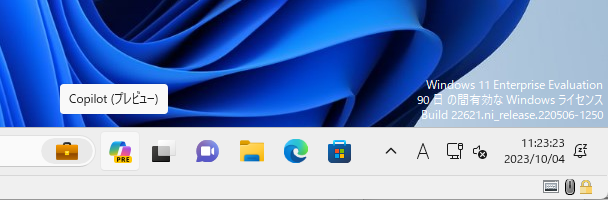
Windows 11 Enterprise Evaluation (評価版) 22H2 で 2023-09 C の新機能たちを有効にしたつもりが、Copilot さんが見当たらない。Evaluation は対象外なの?

新機能が一般提供 (10 B or 11 B?)になると来るのかしらん?


10/4 追記)Microsoft アカウント or 職場(Microsoft Entra ID)or 学校のアカウントによるサインインが必要でした。大変、失礼しました。

Welcome to Copilot in Windows
https://aka.ms/copilotlear    nmore

"If you're signed in with a local account, Copilot in Windows isn't available.”